
Quick answer
Run a refrigeration procurement project through six approval gates, from confirmed need to accepted handover. Freeze a comparable specification, plan dependencies and costs, evaluate compliant offers consistently, and require documented acceptance evidence.
Key takeaways
- What belongs in a refrigeration procurement plan? Include decision gates, the design basis, scope boundaries, dependencies, cost stages, a risk register, supplier evaluation rules and acceptance evidence.
- How does a weighted supplier scorecard differ from the ColdMatch Score? A weighted scorecard applies buyer-chosen weights to defined criteria after mandatory pass/fail checks.
- Is the ColdMatch project planner free? Planning requires a free buyer account, with no payment to create projects, tasks, Gantt, budgets, offer comparisons or collaborator invitations.
- Can I send the RFQ from the Offers tab? Submit the RFQ through the RFQ Builder.
Reviewed: 2026-10-17 · ColdMatch Group
Edition note — 17 October 2026. By ColdMatch Group editorial team, ColdMatch Group, part of Global B2B Group. This is planning guidance, not engineering design, legal or financial advice.
Run a refrigeration procurement project by agreeing the need, approving a design basis, freezing a comparable specification, and issuing a controlled RFQ before selecting a supplier. Work backwards from operational readiness, assign owners to risks and decisions, and release acceptance only against agreed evidence.
Six decision gates
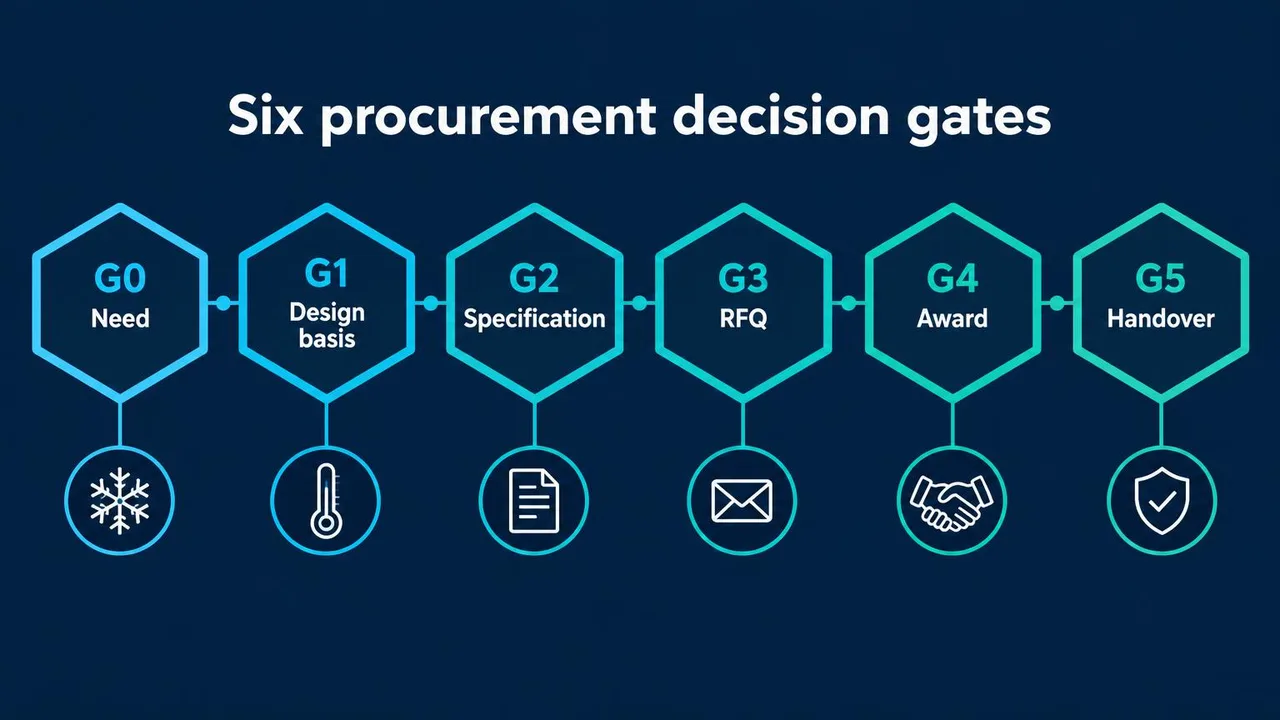
Use gates as permission to proceed, not labels for work already started. Name actual signatories and record conditions before each approval; unresolved assumptions should remain visible.
| Gate | Question to answer | Evidence required | Who signs |
|---|---|---|---|
| G0 Need confirmed | What operational problem must change? | Demand, product flows, capacity objective | Business sponsor |
| G1 Design basis approved | What conditions must the system handle? | Load assumptions, site constraints, utilities | Operations and engineering leads |
| G2 Specification frozen | Can bidders price the same scope? | Revision-controlled specification and acceptance criteria | Engineering and procurement leads |
| G3 RFQ issued | Is the enquiry complete and comparable? | Bid package, response format, clarification process | Procurement lead |
| G4 Award | Is the preferred offer technically and commercially acceptable? | Evaluated bids, resolved exclusions, contract approvals | Authorized buyer and technical lead |
| G5 Handover accepted | Can operations safely own the installation? | Test records, manuals, training, defect disposition | Operations and project leads |
A later change can reopen a gate. Record its effect on capacity, cost, completion and testing rather than quietly editing the original requirement.
Write a specification suppliers can price the same way
Define the design basis: the agreed operating conditions and assumptions used to size and evaluate the installation. For an agricultural cold chain, state product and packaging, intake in kg/day, entry and target temperatures, relative humidity requirements, pull-down time, ambient design conditions and door traffic. Distinguish daily throughput from simultaneous stock and peak arrivals.
Record available electricity, water, drainage and backup arrangements, plus refrigerant constraints for the jurisdiction and site. Ask an appropriately qualified designer to validate assumptions. The refrigeration load calculator supports preliminary exploration; the heat-load guidance helps frame inputs, not certify a design.
Define the scope boundary: where each supplier’s responsibility starts and ends. Allocate civil works, insulation, doors, electrical distribution, controls integration, lifting, installation and disposal explicitly. Require bidders to list deviations and exclusions against the same revision, using the industrial refrigeration RFQ template as a starting structure.
Specify acceptance tests before bids arrive: instruments, operating conditions, measurement locations, stabilization criteria and who witnesses results. Require assumptions to be stated when seasonal product or ambient conditions cannot be reproduced. Otherwise, apparently comparable prices can conceal different performance obligations.
Build the timeline backwards from the season
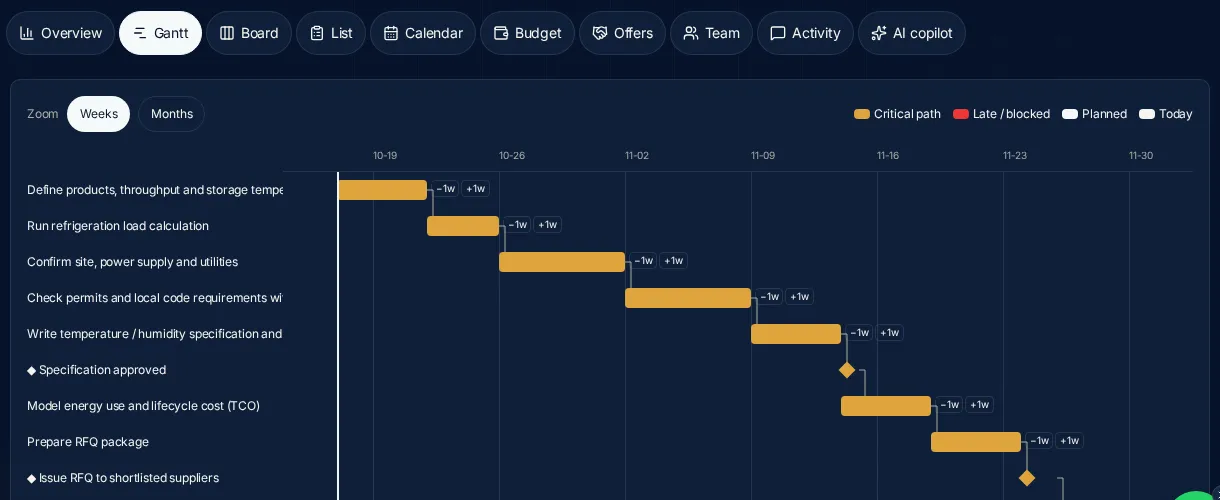
Start at the date operations needs a working facility, not the preferred equipment dispatch date. Reserve space for approvals, site readiness, transport, installation, testing and operator preparation. Ask suppliers to confirm dependencies rather than treating an unqualified lead time as a delivery promise.
Hypothetical example — not a benchmark: a Mexican citrus packhouse planning a new pre-cooling installation might structure its first draft as follows. Week ranges illustrate sequencing only; actual durations require project-specific validation.
| Phase | Illustrative weeks | Release condition |
|---|---|---|
| Need and design basis | 1–2 | Operating assumptions approved |
| Site checks and specification | 3–4 | Utilities and scope confirmed |
| RFQ and clarification | 5–6 | Comparable responses available |
| Evaluation and award | 7–8 | Contract and responsibilities agreed |
| Equipment supply and site preparation | 9–14 | Equipment and site ready together |
| Installation and commissioning | 15–17 | Tests and training completed |
| Handover reserve | 18 | Acceptance evidence reviewed |
The critical path is the connected chain of dependent tasks determining the earliest finish. Float is how long a task can slip without delaying the relevant downstream milestone. Parallel site preparation helps only when its prerequisites and interfaces are genuinely resolved; an optimistic date does not create float.
Apply it in ColdMatch
Open “New project” in the Project Command Center, choose “Template”, and select “New cold storage facility” or another relevant option. Templates create sequential tasks, dependencies and milestones; edit dates to reflect your actual logic. In “List”, check “Depends on”, “Owner / assignee” and “Due”. In “Gantt”, use “Weeks” or “Months”, inspect the highlighted critical path, and shift tasks with “−1w” or “+1w”. Bars cannot be dragged.
Budget in stages, not one number
Keep estimated, quoted, committed and actual amounts separate. An estimate supports early feasibility; a quote is a supplier’s stated offer; a commitment records an obligation; actual records expenditure. Reconcile movements with scope changes rather than overwriting the previous stage without explanation.
Set contingency for identified uncertainty, not as permission to ignore exclusions. State whether land, building works, taxes and duties are included, excluded or awaiting confirmation. Add installation, testing and operational costs where relevant, with clear ownership of each assumption. Use cold-storage cost guidance and construction-cost context to frame questions, not substitute for site-specific quotations.
In “Budget”, use “Add cost line”, select “CAPEX” or “OPEX”, and maintain “Estimated”, “Quoted”, “Committed” and “Actual”. Choose “Base currency” and “Contingency %”. For foreign-currency lines enter “Rate → base” and “Rate source”; entries are timestamped. Record the rate’s effective date in your supporting record and revisit exposure before award. Lines without a required exchange rate are excluded from totals, never guessed, so a displayed total may be incomplete.
Keep a risk register from day one
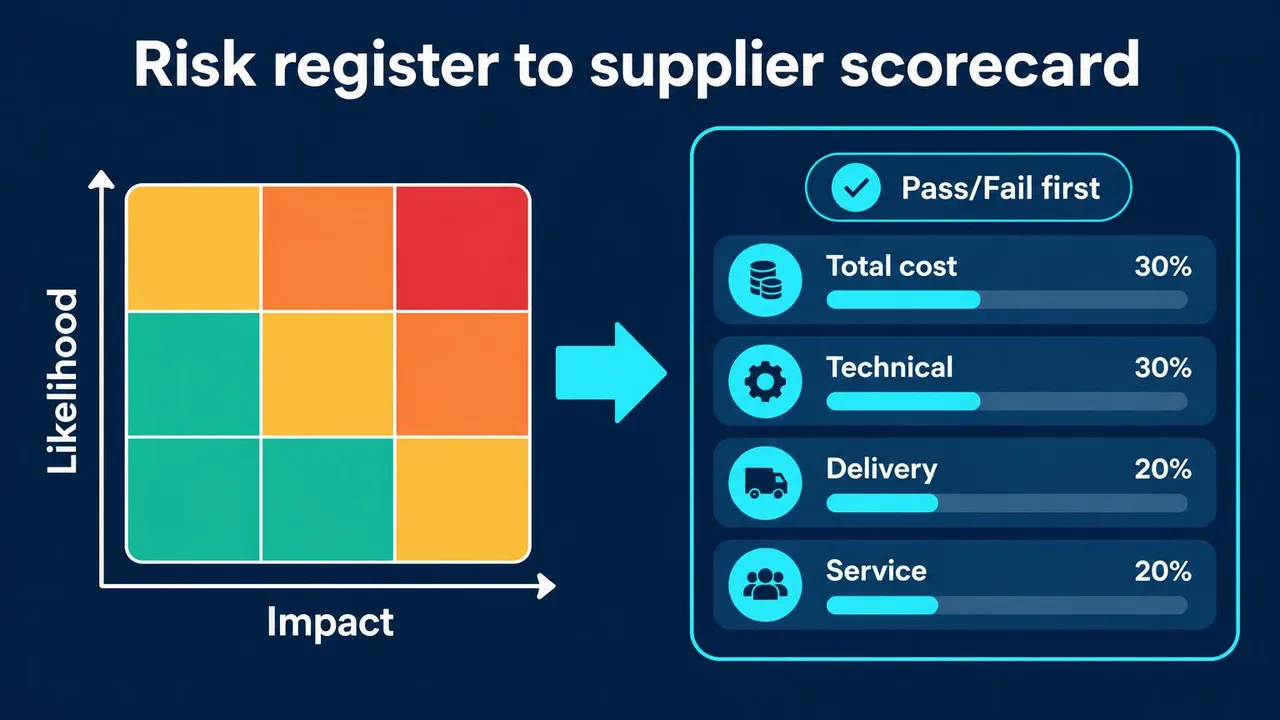
Describe each risk as a possible event with an operational consequence. Assign one owner able to pursue mitigation, define a trigger, and review the register at gates and whenever assumptions change. The following ratings are illustrative judgments, not measured probabilities.
| Risk | Likelihood / Impact | Owner | Mitigation | Trigger |
|---|---|---|---|---|
| Refrigeration load underestimated | M / H | Design lead | Validate product flows and peak loads | Intake exceeds design assumption |
| Power capacity insufficient | M / H | Site engineer | Confirm supply and upgrade requirements | Utility cannot confirm capacity |
| Refrigerant rules change | L / H | Compliance lead | Check applicable rules and alternatives | Proposed equipment faces restrictions |
| Compressor or panel delivery slips | M / H | Procurement lead | Confirm production and logistics dependencies | Supplier misses agreed release milestone |
| Installation and civil scope gap | M / H | Project manager | Allocate interfaces in writing | Both contractors exclude the same work |
| Commissioning overlaps peak season | M / H | Operations lead | Protect test access and contingency arrangements | Installation consumes testing window |
Use “Overview” → “Risks & alerts” for overdue or blocked tasks and budget warnings. Those alerts do not replace this risk register. Put affected work in “Board” → “Blocked” and record the “Blocker” in “List”; a named owner still needs to resolve it.
Score suppliers with a weighted scorecard
Agree mandatory pass/fail criteria before opening offers: required performance, applicable compliance evidence, scope coverage and acceptance commitments. Clarify failures consistently; do not let a low price compensate for an unresolved mandatory requirement. Record the evidence behind every judgment.
Choose weights before seeing prices, then score only comparable scopes. Hypothetical example — not a benchmark: the following weights suit an imagined buyer prioritizing technical fit; they are not a recommended universal allocation.
| Criterion | Example weight | Evidence to examine |
|---|---|---|
| Technical fit | 40% | Design response and performance commitments |
| Evaluated price | 25% | Common scope and exclusions |
| Delivery | 20% | Credible schedule and dependencies |
| Service | 15% | Support coverage and warranty terms |
On a zero-to-five scale, multiply each criterion’s score by its weight and sum the results. Define scoring anchors, such as what earns an adequate versus strong rating, before evaluation. Keep clarification records and test whether modest weight changes alter the preferred supplier. A narrow numerical lead is a prompt for judgment, not automatic authority to award.
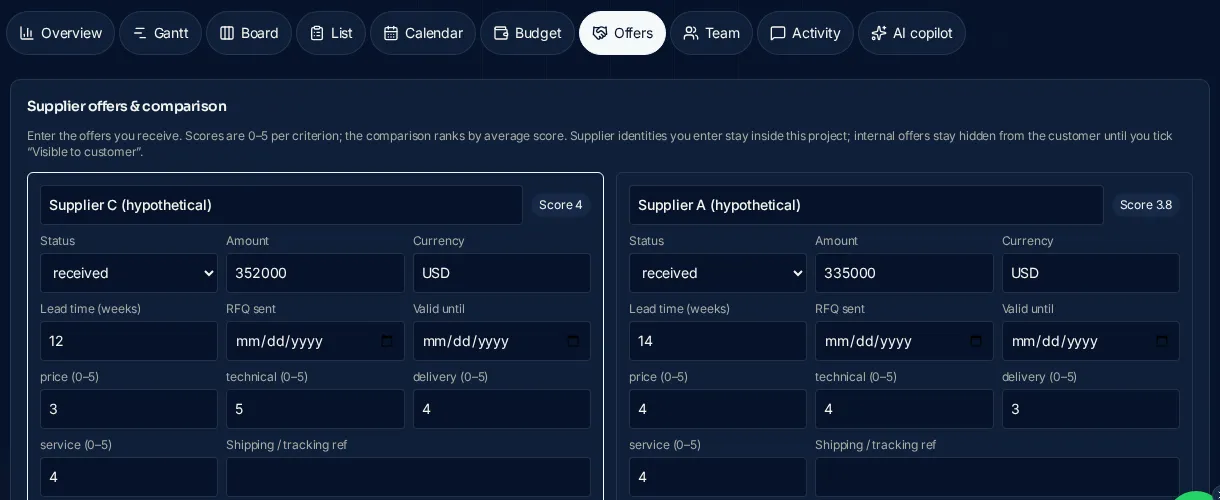
Submit the enquiry through the RFQ Builder. ColdMatch’s team validates it, contacts suitable suppliers on your behalf and presents organized responses. Log and compare responses in “Offers” using “Add offer”, recording “Scope / notes”, “Valid until” and “Lead time (weeks)”.
The built-in “Score” is an equal-weight average of price, technical, delivery and service scores from 0–5. It is not your weighted scorecard: apply your chosen weights in the downloadable template. Team-added offers remain hidden until approved for sharing.
Accept delivery with evidence
Write the acceptance plan into the procurement package and contract rather than negotiating it after equipment arrives. Distinguish physical receipt, installation completion and demonstrated performance; none automatically proves the others.
A factory acceptance test (FAT) checks agreed equipment functions before dispatch where appropriate. Define its scope, witness arrangements and evidence, recognizing that factory conditions may not reproduce the installed system. A site acceptance test (SAT) checks agreed functions after installation, including interfaces and controls under site conditions.
Commissioning is the structured process of checking, setting up and demonstrating that the installed system operates as intended. Assign responsibility for safety checks, instruments, control settings, alarms and operating trials. Agree how deviations will be corrected and retested, and who can authorize conditional acceptance.
Temperature mapping measures spatial and time-based temperature variation across agreed locations and operating conditions. Define sensor placement, calibration evidence, loading and door-use conditions with the responsible specialist; one controller reading is not a map. Record limitations when testing cannot reproduce the intended operating envelope.
At handover, obtain drawings, operating and maintenance instructions, test reports, spare-parts information and training records. Resolve defects or assign documented owners and deadlines. Confirm the contractual warranty start event explicitly; dispatch, delivery, commissioning and acceptance can be different events.
Where ColdMatch fits vs a generic project tool
Use ColdMatch to connect procurement planning with a managed RFQ process. A general project tool may support broad collaboration well, but procurement-specific fields usually require configuration.
| Need | ColdMatch includes | Generic tool typically requires |
|---|---|---|
| Refrigeration sequencing | Templates with phases, dependencies and milestones | A configured task structure |
| Cost-stage tracking | Budget stages and user-entered exchange rates | Custom fields or a separate workbook |
| Offer comparison | Procurement fields and equal-weight scoring | A comparison table or integration |
| Shared execution | Viewer or Editor invitations and activity records | Permissions and workflow setup |
Planning requires a free ColdMatch buyer account; creating projects, tasks, Gantt, budgets, offer comparisons and collaborator invitations requires no payment. Managed procurement services are agreed separately. When an inquiry is linked, the team can see project health in its CRM and base guidance on the current plan.
Limits matter: the planner UI is in English, with no file attachments, email reminders or Gantt bar dragging. Maintain controlled documents separately and agree a review cadence. “AI copilot” → “Review my plan” provides labelled advisory suggestions, not quotes or regulatory guarantees; it adds tasks only after confirmation.
Download the editable templates
Open these CSV files in Excel or Google Sheets and adapt them before use:
- Procurement decision gates: assign signatories and evidence.
- Cold-chain risk register: set owners, mitigations and triggers.
- Weighted supplier scorecard: establish criteria and weights before evaluation.
- Procurement timeline example: replace illustrative dates with validated dependencies.
Keep a revision identifier and decision owner with working copies. A completed spreadsheet records a decision; it does not replace technical validation or contractual approval.
Sources and limits
These sources provide context, not project-specific design or acceptance criteria:
- FAO food loss and waste resources explain the wider food-loss context, not your facility’s refrigeration load.
- UNEP’s sustainable food cold chains report discusses cold-chain sustainability challenges and opportunities, not supplier rankings or guaranteed savings.
- European Commission fluorinated greenhouse gas information provides EU policy context; applicability requires checking the relevant rules and equipment circumstances.
- PMI’s project-management introduction explains general project-management concepts, not refrigeration engineering requirements.
External sources do not endorse ColdMatch. Confirm engineering, safety and regulatory obligations with qualified specialists for the actual location.
Next step
Build a free project, assign gate owners and record unresolved assumptions before requesting prices. When the specification is ready, submit a managed RFQ. Use the intelligence center for further context or ask the team about the process. For the broader planner walkthrough, read the product overview.
Manage refrigeration procurement through explicit decisions and evidence, not equipment price alone.
Build a free procurement projectFrequently asked questions
Plan the numbers before you send an RFQ
The reference pages buyers use most before requesting quotes.