

Quick answer
Cold-chain procurement project management connects technical scope, dependencies, RFQs, supplier evaluation and cost control through commissioning. ColdMatch combines a free buyer-account planner with separately agreed managed procurement: its team reviews RFQs, approaches suitable suppliers and organizes responses.
Key takeaways
- Is the ColdMatch procurement project planner free? Yes.
- Does adding an offer send an RFQ to suppliers? No.
- How should I compare offers in different currencies? Agree a common evaluation basis.
- Does the highest offer score automatically determine the award? No.
Reviewed: 2026-10-17 · ColdMatch Group
ColdMatch Group editorial team · 17 October 2026. English edition for US, UK and international buyers. This is planning guidance, not engineering design or financial advice. ColdMatch Group is part of Global B2B Group.
Procurement project management starts with a comparable scope
Procurement project management software should connect the buying decision to the work required before and after it: specifications, responsibilities, dependencies, commercial evaluation and commissioning. For agricultural cold-chain projects, the central question is not simply which refrigeration package costs least. It is whether every proposal addresses the same operating requirement, installation boundary and acceptance criteria.
ColdMatch’s ambition is to become an operating system for agricultural cold-chain procurement. That is aspirational positioning, not a verified market ranking. Its practical starting point is a free Project Command Center linked to a managed procurement model: buyers prepare a project and submit an RFQ; the ColdMatch team validates it, contacts suitable suppliers on the buyer’s behalf and presents organized responses.
Planning requires a free ColdMatch buyer account. There is no payment to create projects, tasks, Gantt schedules, budgets or offer comparisons, or to invite collaborators. Managed procurement services are agreed separately. This is not a public supplier directory or an instant connection service: there is no direct buyer-to-supplier messaging or disclosure of supplier contact details.
Move from an idea to commissioning through explicit decisions
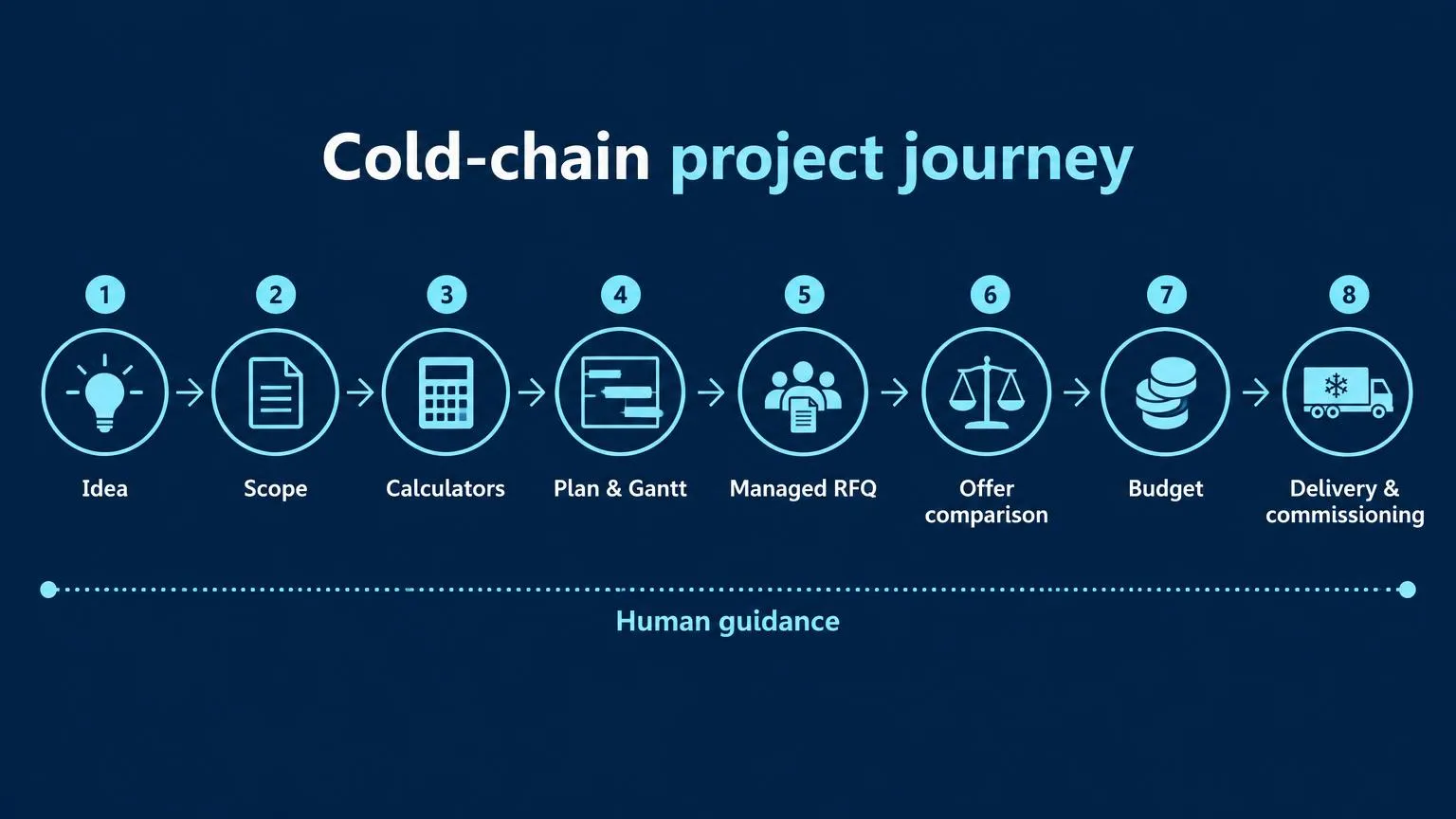
Start with the business idea: what product needs cooling, where does temperature control currently fail, and when must capacity become available? Convert that idea into scope: peak intake, product arrival conditions, storage duration, dispatch pattern, temperature zones and utility constraints. Test feasibility before treating a target opening date or budget as approved.
Use the Knowledge Center to research unfamiliar requirements. Then explore the refrigeration load calculator, cold-room CAPEX estimator and energy lifecycle calculator. These public tools require no upfront payment. Their outputs are planning inputs to question and refine, not engineered designs or supplier quotations.
Translate the scope into a plan, Gantt dependencies and decision milestones. Submit the RFQ, compare organized offers, reconcile the budget and consider financing options where relevant. Follow delivery with installation readiness checks, commissioning and handover. Human guidance belongs throughout this journey, especially when a clarification changes scope, cost or the schedule.
Qualified projects may be introduced to independent financing partners through the Financing Center. ColdMatch and Global B2B Group do not lend or give financial advice. Keep financing availability separate from technical suitability and do not treat an introduction as funding approval.
Build a procurement project management plan in five practical steps
1. Start a project with the right template
Open the Project Command Center, sign in and use "New project". Under "Start from inquiry (optional)", select one of your own submitted inquiries if appropriate. Choose "Template", enter "Title (optional)" and select "Create project". For a cooperative’s new chilled store, "New cold storage facility" provides a relevant starting structure.
The other choices are "Blank project", "Industrial process cooling", "Retrofit / upgrade of existing plant" and "Cold-chain distribution hub". Templates create sequential tasks with dependencies and milestones; all dates are editable. Treat those dates as a draft to reconcile with your engineers, cooperative management and installation constraints.
The workspace tabs are Overview, Gantt, Board, List, Calendar, Budget, Offers, Team, Activity and AI copilot. In Team, invite colleagues by email as Viewer or Editor. Access begins only after they sign in with that verified email. Agree who owns technical decisions, commercial approval and day-to-day updates before sourcing starts.
2. Prepare the procurement timeline and Gantt dependencies
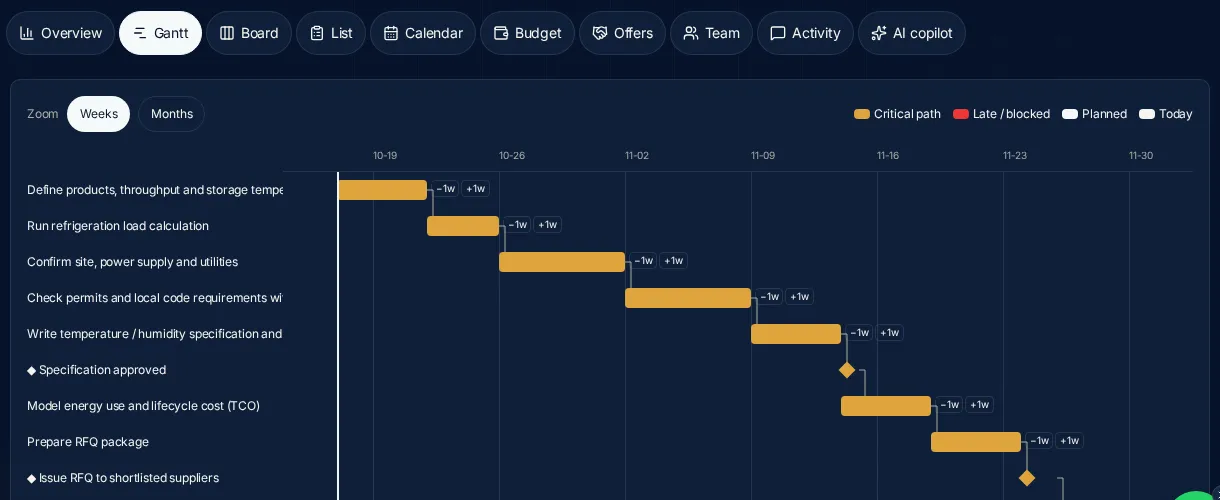
The template phases are Load calculations → Site & utilities → Temperature specs → Energy modelling → Equipment sourcing → Offers & award → Installation & commissioning. Review this sequence against the actual project. For example, an unresolved electrical supply constraint should be visible before a refrigeration package becomes a contractual commitment.
In List, add a task with Phase, then expand it to edit Status, Owner / assignee, Start, Due, % complete and Depends on. Use Blocker for an unresolved constraint and Checklist / subtasks for acceptance details. Specify who will approve assumptions, not just who will collect information.
Open Gantt and use "Weeks" or "Months" zoom to inspect dependency lines, the today line and the highlighted critical path. Use "−1w" or "+1w" to shift a task; bar dragging is not available. Check the milestones Specification approved, Issue RFQ to shortlisted suppliers, Contract awarded and Handover. Calendar provides a month grid of due dates for a complementary deadline review.
3. Create the RFQ in RFQ Builder, then log its progress in Offers
Submit the sourcing request through RFQ Builder, not through the Offers tab. Describe the product, throughput, incoming and target temperatures, operating hours, site utilities, supply boundary and commissioning expectations. Distinguish confirmed requirements from assumptions so the team can identify questions before suppliers price inconsistent scopes.
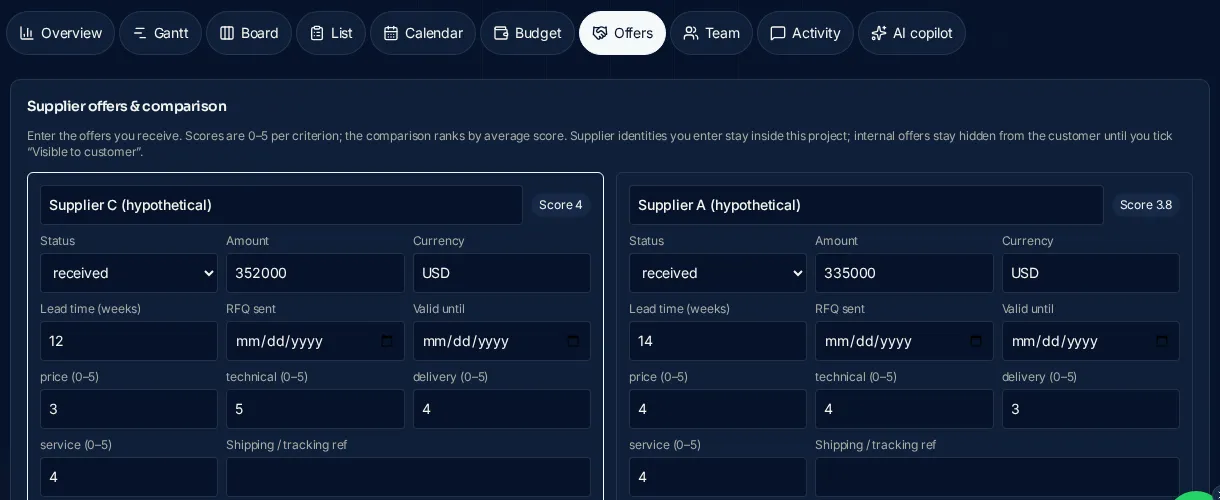
ColdMatch reviews the RFQ, contacts suitable suppliers on your behalf and presents organized responses. In Offers, select "Add offer" and record the supplier label, Status, RFQ sent and Valid until. Use "requested" while waiting and "received" when a response is available. Enter Amount, Currency and Lead time (weeks) when known rather than using placeholder prices.
Use Scope / notes to record exclusions and clarification requirements. Offers added by the ColdMatch team remain hidden from the customer until approved for sharing. The buyer portal holds RFQs and proposals; the planner’s Offers tab tracks and compares offers. Do not assume that adding an offer submits an RFQ or contacts a supplier.
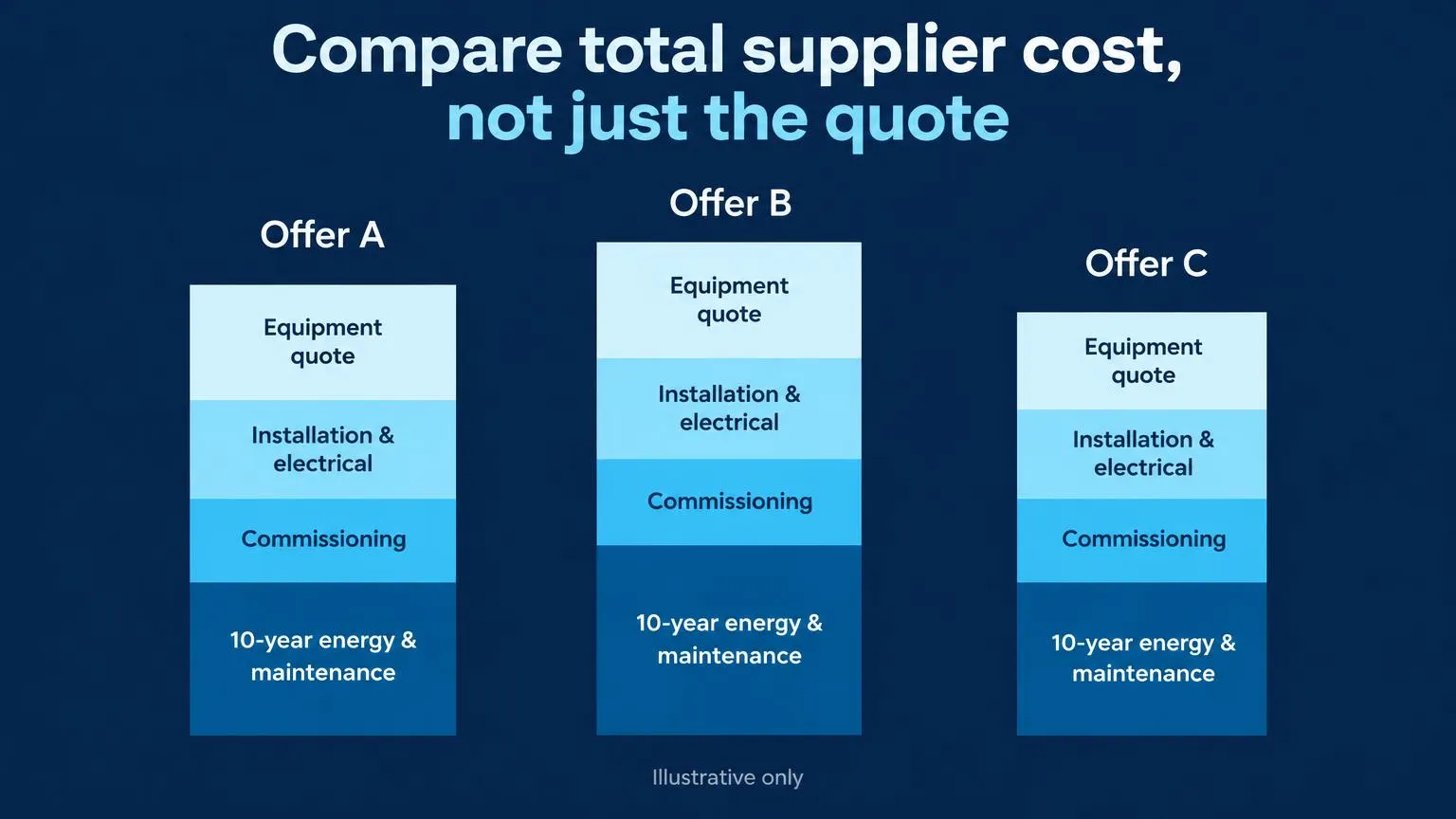
4. Compare total supplier cost, not only the quoted amount
Create a consistent supplier comparison template in your evaluation process: same scope, delivery boundary, currency basis, operating assumptions and acceptance tests. In Offers, score price, technical, delivery and service from 0–5. The average "Score" ranks offers; it is not a configurable weighted score or proof that a proposal meets every mandatory requirement.
Use Status values "shortlisted", "approved", "rejected" and "contracted" as decisions develop. Explain your reasoning in Scope / notes, including why a higher-ranked offer might fail a mandatory condition. Keep three cost views distinct: quoted cost is the proposal; committed cost is the obligation you accept; lifecycle cost adds the operating and maintenance assumptions used over a chosen evaluation period.
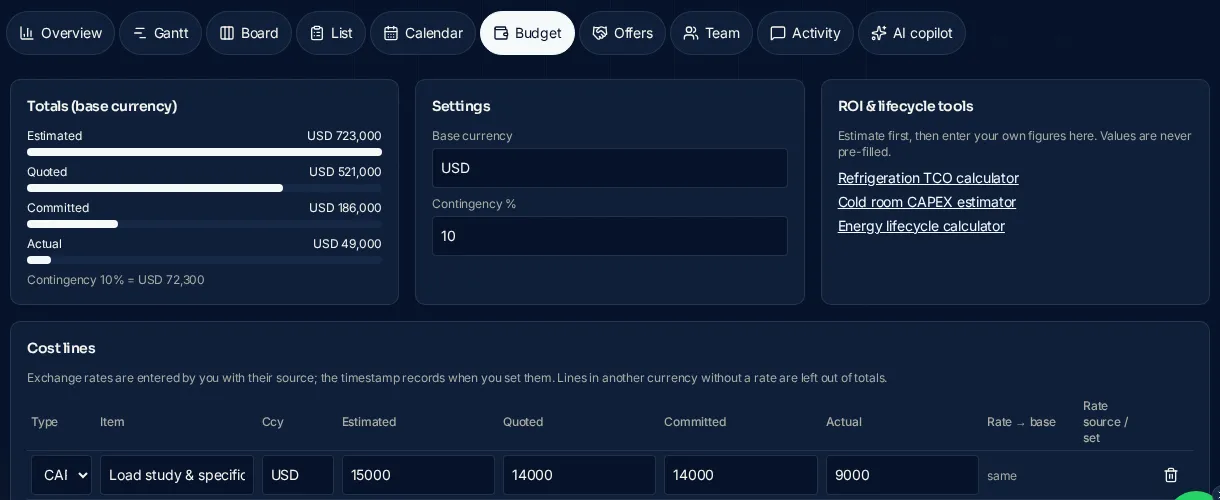
In Budget, choose "Add cost line" and set Type to CAPEX or OPEX. Enter Item, currency, Estimated, Quoted, Committed and Actual as evidence becomes available. These are stages of the same cost line, not amounts to add together. Settings include Base currency and Contingency %. Nothing is pre-filled.
For foreign-currency lines, enter "Rate → base" and "Rate source"; the entries are timestamped. Lines without a rate are excluded from totals rather than guessed. Reconcile those omissions before approving expenditure. Use the refrigeration TCO calculator to explore lifecycle scenarios separately, keeping energy tariff, utilization and maintenance assumptions consistent across options. A scenario does not guarantee future operating expenditure.
5. Monitor milestones and risk until handover
Use Overview to review Progress %, milestones done, Next deadline, Risks & alerts, Budget vs actual bars and the Phase roadmap. Alerts cover overdue and blocked tasks, committed costs above estimate plus contingency, and cost lines needing an exchange rate. Review the critical path count, then open Gantt to understand which highlighted tasks threaten the completion sequence.
In Board, move tasks between To do, In progress, Blocked and Done by drag and drop; on phones, use the status menu. A blocked task needs an owner and a resolution decision, not merely a new due date. Activity supports comments with @mentions and an automatic activity log; do not depend on email reminders or notifications.
When an inquiry is linked, the ColdMatch team can see project health in its CRM, including progress, mini Gantt, overdue or blocked work, budget versus quotes and offers. This supports guidance based on the current plan. In AI copilot, "Review my plan" provides labelled, advisory suggestions; a suggested task is added only after your confirmation. It does not provide quotes or regulatory guarantees.
A cooperative packhouse budget needs explicit boundaries
Consider a hypothetical fruit and vegetable cooperative planning pre-cooling and chilled storage alongside its packhouse. The procurement team should establish crop compatibility, arrival temperatures, peak harvest intake and dispatch timing before requesting equipment prices. Storage capacity and pre-cooling duty answer different questions; qualified designers must establish the actual requirements.
Hypothetical illustration — not a quote or benchmark. The round USD figures below illustrate a planning allowance for selected cold-chain work packages, not the cost of a complete packhouse or a typical facility.
| Cost category | Hypothetical allowance (USD) | Scope question to resolve |
|---|---|---|
| Load study | 10,000 | Which intake and cooling assumptions are approved? |
| Insulated panels | 80,000 | Are doors, floor interfaces and sealing included? |
| Refrigeration plant | 140,000 | Are controls and pre-cooling duties included? |
| Electrical works | 40,000 | Where does the supply boundary begin? |
| Installation | 50,000 | Are access equipment and connections included? |
| Commissioning | 20,000 | Which tests, training and handover records are included? |
| Subtotal | 340,000 | Selected packages only |
| Contingency 10% | 34,000 | Applied to the subtotal |
| Total planning allowance | 374,000 | Not a supplier quotation |
This illustration excludes land, building shell, external civil works, sorting and packing equipment, taxes, duties, financing costs and working capital. Identify and price these separately where applicable. A packhouse project cost cannot be inferred from the refrigeration allowance alone. Likewise, contingency is not permission to leave a known scope gap unpriced.
In the planner, enter the six work-package estimates as cost lines and set Contingency % to 10 rather than also adding a duplicate contingency line. Add separately identified exclusions as their own estimates when supported. As proposals arrive, update Quoted; after award, update Committed; as expenditure is recorded, update Actual. Investigate differences before changing the original planning basis.
Use a cold-chain workspace when domain structure matters
A general project-management tool can support procurement planning. The practical choice is how much cold-chain structure you want supplied versus configured yourself. This comparison describes ColdMatch’s included functions, not the capabilities of any named competitor.
| Planning need | ColdMatch planner includes | In a general tool, you would usually need to set up… |
|---|---|---|
| Cold-chain phases | Domain templates, dependencies and milestones | Your phase structure and task relationships |
| Schedule review | Gantt, critical path and late/blocked highlights | Appropriate schedule views and risk conventions |
| Cost control | CAPEX/OPEX; Estimated, Quoted, Committed, Actual | Cost fields, stage definitions and reporting |
| Offer evaluation | Four 0–5 criteria and an average Score | An evaluation table and scoring method |
| Procurement route | Link to team-reviewed managed RFQ | Your sourcing process and responsibilities |
| Early calculations | Links to cold-chain planning calculators | Your calculation resources and assumptions |
The planner is not a replacement for engineering approval, accounting controls or contract review. It currently has no file attachments, Gantt bar dragging or email reminders/notifications. Keep source documents in your organization’s controlled system and make the planner’s notes sufficiently clear to identify the decision basis.
Check readiness before RFQ, award and commissioning
- [ ] Name a decision owner, technical reviewer and budget approver.
- [ ] Confirm product flow, temperature requirements and peak operating assumptions.
- [ ] Record site, utility and installation access constraints.
- [ ] Approve the specification milestone before issuing the RFQ.
- [ ] Compare inclusions, exclusions, lead times, validity and acceptance criteria.
- [ ] Resolve missing exchange rates before relying on budget totals.
- [ ] Separate quoted, committed and actual costs; review lifecycle assumptions.
- [ ] Confirm delivery responsibility and record Shipping / tracking ref when available.
- [ ] Plan commissioning tests, operator training and handover evidence.
- [ ] Review blocked work and obtain human clarification before closing decisions.
Sources and limits: context is not project-specific proof
UNEP and FAO’s Sustainable Food Cold Chains report supports a systems approach to sustainable cooling, including efficiency and refrigerant considerations. It does not establish this project’s refrigeration duty, budget, savings or supplier suitability.
The European Commission’s F-gas information provides EU policy and regulatory guidance. It does not establish compliance for a particular design or settle US, UK or other local requirements. Have qualified advisers check the rules applicable to the installation location and equipment.
Product instructions here follow ColdMatch’s supplied feature brief. External sources do not verify the planner or endorse ColdMatch. Calculator outputs, hypothetical allowances and offer scores cannot replace project-specific engineering, commercial due diligence or an agreed acceptance process.
Build the plan first, then compare suppliers through managed RFQ
Build a project to organize scope, responsibilities, milestones and budget in a free buyer account. When the requirement is ready for review, compare suppliers via managed RFQ: the ColdMatch team validates the request, approaches suitable suppliers on your behalf and organizes responses for your decision.
Plan the operating requirement, buying process and commissioning decisions together.
Build your free procurement projectFrequently asked questions
Plan the numbers before you send an RFQ
The reference pages buyers use most before requesting quotes.